
Mastering ChatGPT-5: Complete Guide to Setup, Hidden Features, and Productivity Hacks
#87: Setup + Workflows + Prompt Patterns (Copy/Paste Ready)

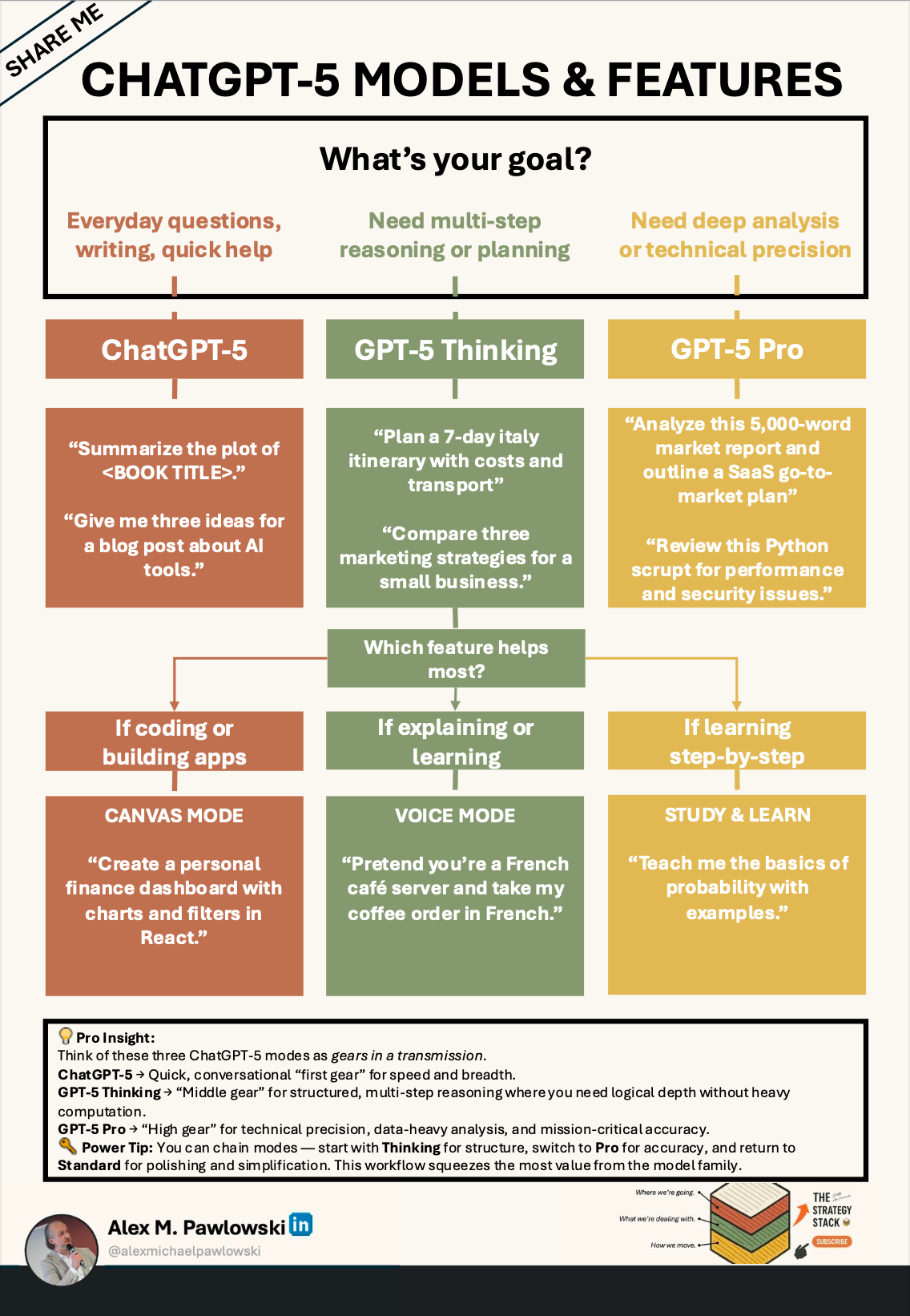
TL;DR / Quickstart
Turn on Memory (Settings → Personalization)
Enable Web Browsing + Advanced Data Analysis
Use this starter prompt:
“Act as my strategy analyst. Ask me 5 questions, then propose a plan and output it as a table.”Save your best prompts as a template library
Updated Table of Contents
Introduction: Why ChatGPT-5 Changes the Game
Getting Started
2.1 Creating Your Account
2.2 Choosing the Right Plan (Free vs Plus)
2.3 Understanding the InterfaceFirst-Time Setup
3.1 Adjusting Settings for Your Needs
3.2 Personalization & Memory Features
3.3 Linking External Tools (Web Browsing, Code Interpreter, etc.)Core Skills: Talking to ChatGPT-5
4.1 Writing Effective Prompts
4.2 Using Role-Playing for Better Results
4.3 Chaining Questions for DepthPro Tips & Lesser-Known Tricks
5.1 System Messages for Custom Behavior
5.2 How to Ask for Structured Output (Tables, Lists, JSON)
5.3 Using Multi-Step Reasoning for Complex Tasks
5.4 Leveraging File Uploads for Deep Analysis
5.5 Combining Images + Text for Smarter Queries
5.6 Agentic Overdrive
5.7 Tool Preamble Magic
5.8 Invisible Self-ReflectionCommon Pitfalls & How to Avoid Them
Use Cases for Work, Creativity, and Learning
7.1 Business & Productivity
- What You Can Do
- How To
7.2 Content Creation & Research
- What You Can Do
- How To
7.3 Coding & Data Analysis
- What You Can Do
- How To
7.4 Language Learning & Skill Building
- What You Can Do
- How ToPrivacy, Safety, and Ethical Use
8.1 Protecting Sensitive Data
- Pointers
- How To
8.2 Verifying Factual Accuracy
- Pointers
- How To
8.3 Avoiding and Managing Bias
- Pointers
- How ToResources & Further Learning
9.1 OpenAI Help Center
- What It Is
- Pointers
9.2 AI Prompt Libraries (PromptHero, FlowGPT)
- What They Are
- Pointers
- Example AI-driven Workflows
9.3 AI Community Forums & YouTube Tutorials
- What They Are
- Pointers
- Pro TipQuick Reference: Prompt Patterns That Work Every Time
1. Introduction: Why ChatGPT-5 Changes the Game
ChatGPT-5 isn’t just a faster, smarter version — it’s a leap toward natural, context-aware conversation (extended by potentially using sophisticated context windows and MCP). It can remember what you’ve told it (if you enable memory), work with images, analyze files, and even connect to the live web. Whether you’re a student, entrepreneur, developer, or simply curious, ChatGPT-5 can become your all-purpose assistant mastering generative AI systems — if you know how to set it up and talk to it.
Model names and availability vary by plan/region (e.g., GPT-5.2 on Free tier).
Last updated: Jan 2026
If you’re using ChatGPT for strategy work, these three pieces will upgrade how you think and execute.
Build an AI strategy that actually executes

Copy/paste prompt library (strategists)

Agentic systems: what’s coming + what to do

2. Getting Started
2.1 Creating Your Account
Visit chat.openai.com and sign up. You can use an email address or log in via Google or Microsoft.
ChatGPT Login (chatgpt.com): Quick Fixes
If you can’t log in to ChatGPT, check the ChatGPT login troubleshooting guide in the OpenAI Help Center.
If ChatGPT isn’t working, visit the official status page to see if there’s an outage.
Try clearing cookies, using a private browser window, or signing in again at chatgpt.com.
Why is ChatGPT asking me to log in again?
This can happen after updates, session expiration, browser changes, or if cookies are cleared.
2.2 Choosing the Right Plan
Free tier: Good for casual use (limits may apply depending on usage and region).
Plus tier: Best for heavy users who want higher limits, faster responses, and access to advanced features sooner.
2.3 Understanding the Interface
The left panel stores your chats, the center is your conversation, and the top-right menu contains your account settings. Simple, but customizable.
3. First-Time Setup
3.1 Adjusting Settings
Go to Settings → General to tweak your theme (light/dark), text size, and accessibility options.
3.2 Personalization & Memory
In Settings → Personalization, you can:
Set your tone preference (formal, casual, technical, etc.)
Enable Memory so ChatGPT-5 can remember your style, recurring topics, or preferences between sessions.
Pro tip: You can always tell it “Forget everything we’ve discussed” or delete memory from settings.
3.3 Linking External Tools
Under Settings → Features, enable:
Web Browsing → Live, up-to-date answers.
Advanced Data Analysis → Code, charts, file parsing.
Third-Party Plugins (if available) → Integrate with external apps like Google Drive or Zapier.
The bottleneck isn’t capability—it’s coordination. That’s where agentic strategy →
4. Core Skills: Talking to ChatGPT-5
4.1 Writing Effective Prompts
Think of prompts like instructions to a very smart assistant:
[boxed prompt]
Summarize this report into 3 bullet points for executives.Assume you’re a financial analyst reviewing Q2 earnings. Extract the 5 most important risks and 3 key opportunities.4.2 Using Role-Playing
“Act as a [role] and [task]…” is one of the most reliable prompt starters.
[boxed prompt]
Act as a UX designer and critique my website’s layout. Give me 5 improvements ranked by impact.4.3 Chaining Questions for Depth
Instead of asking one big question, break it into parts:
[boxed prompt]
First, create a clear outline for this topic.
Then expand each section with examples.
Finally, rewrite the final result in a concise, executive-friendly tone.
Topic: [PASTE TOPIC HERE]
5. Pro Tips & Lesser-Known Tricks
5.1 System Messages for Custom Behavior
Before your first question, set the tone:
[boxed prompt]
From now on, answer like a friendly science teacher using analogies.5.2 Ask for Structured Output
Tell ChatGPT-5 exactly how to format the answer:
[boxed prompt]
Give me the answer in a 3-column table with headers: Feature, Benefit, Example.Return the result as JSON with the fields: summary, key_points, risks, next_steps.5.3 Multi-Step Reasoning
For complex problems, instruct:
[boxed prompt]
Think through this step-by-step before giving your final answer.Think through this carefully. Then give me the answer as a short list of actions I can take immediately.5.4 File Uploads for Deep Analysis
Drag in PDFs, CSVs, or images and ask it to analyze, summarize, or visualize.
[boxed prompt]
Analyze this file. Summarize the main insights, highlight anomalies, and suggest 3 next steps.
Output the result in a table.
5.5 Combining Images + Text
Upload an image and give text instructions:
[boxed prompt]
Here’s a screenshot of my app. Suggest 3 UI improvements and explain why each change matters.5.6 Agentic Overdrive
Command line:
[boxed prompt]
Stick with the following problem, until it is solved entirely. Even if in doubt, decide yourself and document every step along the way.

Problem: [DESCRIBE THE PROBLEM HERE]
Why it matters: This mode tells ChatGPT-5 to act like a determined problem-solver — it won’t stop halfway or wait for you to guide it. It keeps pushing until the task is finished, while logging each step for transparency.
Tip: If it gets stuck, restart with a smaller version of the task and build up from there.
5.7 Tool Preamble Magic
Command line:
[boxed prompt]
Repeat my goal, create a step plan and report live.

Goal: [WRITE YOUR GOAL HERE]
Why it matters: Perfect when you want to ensure ChatGPT-5 fully understands your intent before starting. It restates your goal, builds a step-by-step plan, and reports progress live — almost like a mission dashboard.
Tip: If the plan drifts, restate your goal in one sentence and ask it to regenerate the steps.
5.8 Invisible Self-Reflection
Command line:
[boxed prompt]
Create an internal 7-point list for peak quality, check and improve until all points are fulfilled - don't show me the list.

Task: [PASTE YOUR TASK HERE]
Why it matters: This enables ChatGPT-5’s hidden quality-control mode. It silently applies a rigorous 7-point checklist before you see the answer, polishing it without you having to request revisions.
Tip: If quality drops, ask for a second pass: “Improve clarity, structure, and precision.”
6. Common Pitfalls & How to Avoid Them
Being too vague → Leads to generic answers.
Forgetting follow-ups → Each conversation can refine the previous answer.
Ignoring system settings → Personalization features can save time.
7. Use Cases
7.1 Business & Productivity
Automate meeting notes, draft proposals, analyze reports.
What you can do:
Automate meeting summaries
Draft professional proposals
Analyze large reports for key insights
How to:
Meeting Notes Automation
Upload the transcript or meeting notes file (TXT, DOCX, or PDF).
[boxed prompt]
Summarize this meeting into 5 bullet points, highlight decisions made, and list follow-up actions.Proposal Drafting
Give context (company, client, goals).
[boxed prompt]
Draft a concise 2-page proposal for [PROJECT GOAL], highlighting benefits, costs, and timeline.
Context:
- Company: [YOUR COMPANY]
- Client: [CLIENT]
- Constraints: [BUDGET / TIMELINE]
Report Analysis
Upload the document or paste key sections.
[boxed prompt]
Summarize the key findings of this report in a table with columns: Insight, Impact, Recommended Action.7.2 Content Creation & Research
Brainstorm blog ideas, rewrite articles, create outlines.
What you can do:
Generate blog post ideas
Rewrite and optimize articles
Create detailed outlines
How to:
Brainstorm Blog Ideas
Give a topic or target audience.
[boxed prompt]
Give me 15 unique blog post ideas on [TOPIC] for [AUDIENCE], sorted by originality.Rewrite Articles
Paste the content or upload a file.
[boxed prompt]
Rewrite this article in a conversational tone, keeping all facts accurate. Improve clarity, remove fluff, and keep it punchy.Outline Creation
[boxed prompt]
Create a detailed outline for a 1500-word article on [TOPIC], including H2 and H3 headings.7.3 Coding & Data Analysis
Debug scripts, explain algorithms, create visualizations.
What you can do:
Debug scripts
Explain complex algorithms
Create visualizations
How to:
Debugging
Paste your code.
[boxed prompt]
Find and fix errors in this code. Explain your reasoning and provide the corrected version.

Code:
[PASTE CODE HERE]
Algorithm Explanation
[boxed prompt]
Explain this algorithm step-by-step as if teaching a beginner programmer. Use a simple example and show intermediate steps.Data Visualization
Upload CSV or Excel file.
[boxed prompt]
Using this CSV/Excel data, generate a bar chart comparing [COLUMN A] and [COLUMN B], then explain the trends in plain English.7.4 Language Learning & Skill Building
Daily conversation practice, grammar correction, flashcard creation.
What you can do:
Practice conversations
Correct grammar mistakes
Create flashcards
How to:
Daily Conversation Practice
[boxed prompt]
Act as a native [LANGUAGE] speaker and have a 5-minute conversation with me about [TOPIC]. Correct my mistakes politely.Grammar Correction
Paste your text.
[boxed prompt]
Correct grammar, punctuation, and word choice errors in this text, and explain each correction.Flashcard Creation
[boxed prompt]
Create 20 flashcards for learning [TOPIC/LANGUAGE CONCEPT], formatted as question/answer pairs.8. Privacy, Safety, and Ethical Use
Avoid sharing sensitive personal or business data.
8.1 Protecting Sensitive Data
Pointers:
Treat ChatGPT-5 like an assistant in a public workspace — anything you type could be stored or reviewed for improvement.
Do not share personal identifiers (full name, address, ID numbers) or confidential business data unless you are fully comfortable with potential exposure.
Use placeholders (e.g.,
[ClientName],[RevenueFigure]) instead of real names/numbers when possible.
How-to:
Mask Data Before Sharing
Instead of:
"Create a client proposal for ACME Corp with a $1.2M budget."
Use:
"Create a client proposal for [CLIENT] with a [$BUDGET] budget."
[boxed prompt]
Rewrite this message so it removes all sensitive data (names, emails, exact numbers). Replace them with placeholders in brackets.
Text:
[PASTE TEXT HERE]
Offline Processing for Sensitive Files
For highly confidential files, consider using local AI tools or manual redactions before upload.
Always verify factual answers.
8.2 Verifying Factual Accuracy
Pointers:
ChatGPT-5 can browse the web (if enabled), but even then, double-check everything.
Always confirm critical details (dates, figures, legal terms) with official sources.
How-to:
Cross-Reference
After receiving an answer, prompt:
[boxed prompt]
List 3 credible sources for this information with direct quotes (short quotes are fine), and tell me what to verify before trusting it.Fact-Check Key Data
Use web search to verify numbers, statistics, and factual claims.
Flag Uncertain Information
If ChatGPT-5 says “I’m not sure” or “It may be,” treat it as a signal to verify before acting.
Be mindful of AI biases and misinformation risks.
8.3 Avoiding and Managing Bias
Pointers:
AI reflects patterns from its training data — including cultural, political, or linguistic biases.
Be intentional about asking for multiple viewpoints.
How-to:
Request Balanced Perspectives
[boxed prompt]
Give me 3 perspectives on this issue — supportive, critical, and neutral.Explicitly State Your Context
[boxed prompt]
Explain this law from both a business and consumer rights perspective.Run a Bias Check
[boxed prompt]
Review your last answer and point out any possible bias in wording, examples, or assumptions.9. Resources & Further Learning
OpenAI Help Center
9.1 OpenAI Help Center
What it is:
The official support hub for ChatGPT users — includes feature guides, troubleshooting steps, and updates on new releases.
Pointers:
Use the search bar with keywords like "Memory Settings", "Web Browsing", or "File Uploads".
Check the Release Notes section for the latest features and improvements.
Save the Known Issues page so you can quickly see if a bug you’re experiencing is already reported.
AI Prompt Libraries (PromptHero, FlowGPT)
9.2 AI Prompt Libraries (PromptHero, FlowGPT)
What they are:
Community-curated collections of effective prompts, sorted by category and use case.
Pointers:
Start with prompts in your field (e.g., “marketing”, “coding”, “data analysis”) and adapt them to your needs.
Look for highly-rated prompts — they’re often tested by many users.
Reverse-engineer good prompts by studying their structure and reusing the format with your own topic.
Example workflow:
Search PromptHero for "resume improvement".
Copy the structure of a top-rated prompt.
Replace the example content with your own details.
AI community forums and YouTube tutorials
9.3 AI Community Forums & YouTube Tutorials
What they are:
User-driven spaces to exchange tips, share workflows, and troubleshoot together.
Pointers:
Join active forums like OpenAI Community, Reddit r/ChatGPT, or Hugging Face forums for real-time discussions.
On YouTube, search for “ChatGPT-5 workflows” or “prompt engineering tutorials” to see examples in action.
Follow creators who specialize in your niche — e.g., tech, writing, productivity — to get tailored tips.
Pro tip: Use timestamps in YouTube descriptions to jump straight to the sections showing actual prompts and outputs.
10. Quick Reference: Prompt Patterns That Work Every Time
“Act as a [role] and…”
“Explain like I’m five / like I’m an expert”
“Give me the answer as a [format]”
“List pros, cons, and examples”
“Think step-by-step”
Agentic Overdrive → “Stick with the following problem…”
Tool Preamble Magic → “repeat my goal, create a step plan and report live.”
Invisible Self-Reflection → “Create an internal 7-point list…”
[boxed prompt]
Act as a [ROLE] and help me with [TASK]. My context: [CONTEXT]. My goal: [GOAL]. Output format: [FORMAT].Explain this like I’m five, then explain it again like I’m an expert.
Topic: [TOPIC]List pros, cons, and examples. Then recommend the best option for my situation.
Situation: [YOUR SITUATION]
Hit subscribe to get it in your inbox. And if this spoke to you:
➡️ Forward this to a strategy peer who’s feeling the same shift. We’re building a smarter, tech-equipped strategy community—one layer at a time.
Let’s stack it up.
A. Pawlowski | The Strategy Stack